Reports
lint says whether everything is declared. The reports show what was declared, from one number per axis down to each line.
Summary: aisignoff report
$ aisignoff report
2 files, 34 lines, declared line by line

Generation
  G0         Human                                     23   67.6%
  G1         AI-assisted                                1    2.9%
  G3         AI-autonomous                             10   29.4%

Human review
  H2         Reviewed line by line                     34  100.0%

AI review
  A0         No independent AI review                  23   67.6%
  A1         Context-free check                        11   32.4%

Findings (of the last independent AI review)
  F-         No independent AI review since last change        34  100.0%
The shares count files, or lines with [history]. Each axis is counted on its own, with an undeclared share for what is missing, TODO, invalid or has an error about that axis (how axes are counted). The findings come last: what the last independent AI review of each line found, F- where none has covered it since it last changed (Findings).
--filesgives one line per file: its levels (with[history], the share of each combination of levels), where they come from (SIGNOFF.toml [2]is the second annotation), and any problems.--jsongives the same per file for other tools:{"format": 1, "aisignoff": VERSION, "files": [...]}. With[history], each file hasparts: runs of lines with one declaration, withkinds(where each axis comes from) andadvisory(lines that haven't landed and wait for their pull request). See JSON output for every key and Compatibility for whatformatpromises.
Folder tree: report --tree
$ aisignoff report --tree
                       files  Generation      Human review  AI review        Findings
.                         30  G0 3% · G3 97%  H1 100%       A1 93% · A2 7%   F0 7% · F- 93%
├─ .github/workflows/      6  G3 100%         H1 100%       A1 100%          F- 100%
├─ docs/                   9  G3 100%         H1 100%       A1 100%          F- 100%
├─ src/aisignoff/          8  G3 100%         H1 100%       A1 88% · A2 12%  F0 12% · F- 88%
└─ tests/                  1  G3 100%         H1 100%       A1 100%          F- 100%
The level mix of each folder. Folders that hold nothing but one subfolder share a row; files without a valid declaration are always listed under their folder, with the reason.
| Option | Effect |
|---|---|
--depth N |
folders down to depth N only (0: just the total) |
--weight lines |
shares by lines instead of files |
--files |
every file, not only the ones with problems |
--markdown |
a Markdown table, for the job summary of a CI run |
--json |
the whole tree with the counts of each folder |
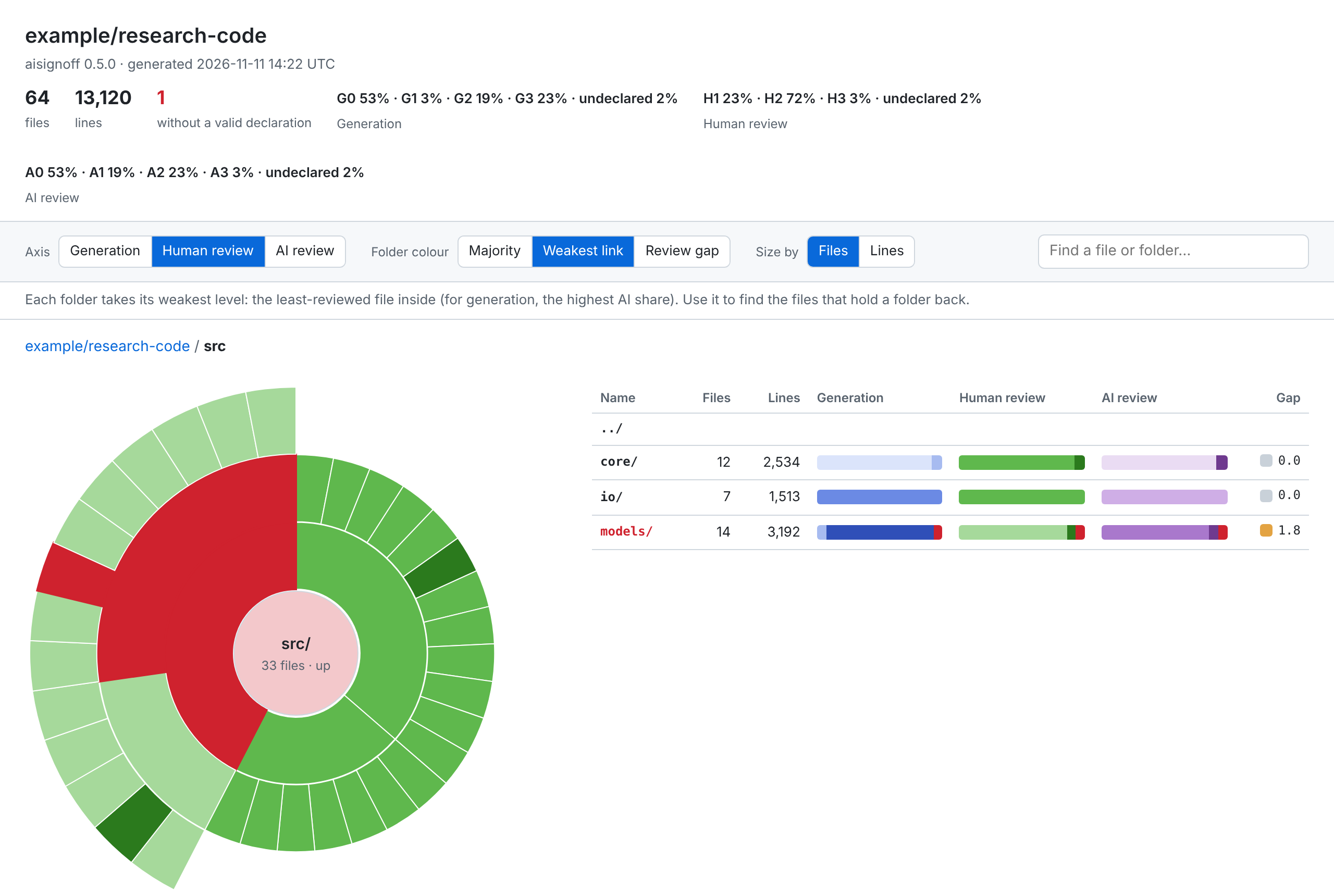
The interactive report
aisignoff report --html aisignoff-report.html --with-source
writes a single HTML file, like a coverage report for AI use. It needs no server or internet connection, so it can be opened locally, attached to a release or downloaded from a CI run.
| Option | Effect |
|---|---|
--title TITLE |
the page title (default: the repository or folder name) |
--with-source |
embeds the text of each file (up to 512 KB each, not binary files) for the line view |
--since BASE |
marks what changed since BASE (its merge base with HEAD), such as origin/main in a pull request or the last release tag |
--with-source puts the code into the report: share it only with people who may read the repository. Symlinks are never followed.
With --with-source the report also carries highlight.js (about 105 KB, BSD-3-Clause) for the syntax colours of the line view. The language comes from the file's name or its #! line: Python, Julia, Fortran, MATLAB, LaTeX, TOML and INI, YAML, JSON, shell, Markdown, C, C++, R, Rust, Go, JavaScript, TypeScript, HTML and XML, CSS, Make, CMake, Dockerfile, SQL and diffs. Other files are shown uncoloured.
What it shows:
- Sunburst. Each ring is a folder level, each arc as large as its files or lines. Click a folder to zoom in, the centre to go back up.
- Folder table. The folders and files of the current folder, with a bar per axis. Sort by a column, for example Human review to find the least-reviewed folder.
- File details. A file's levels, the names behind them, where they come from and any problems. On GitHub Actions, file names link to the file at that commit.
- Lines. A strip of the whole file coloured by each line's level, and with
--with-sourcethe text itself with the level in the margin, in GitHub's syntax colours. Hover the margin for where a declaration comes from. - Changes. With
--since, a Changed column, a switch to show only what changed, and the changed lines marked+in the file details. - Find and links. Type part of a path to jump to it. The address keeps the view, so a link opens the same folder, file and line.
The axis buttons choose what is coloured: Generation, Human review, AI review, or Findings, the highest finding the last independent AI review of a line left open (F0 to F3), grey for F- (no such review since the line last changed). Each axis has its own ramp from light (level 0) to dark (level 3), the same in light and dark mode. Two figures at the top flag what needs attention: the share of lines at F-, and the share with an open major or critical finding (F2, F3). A folder, which mixes levels, is coloured by:
| Colour | A folder shows |
|---|---|
| Average (default) | the weighted average of its levels, between the steps, with a red outline when anything inside is undeclared |
| Majority | the level that covers most of its files or lines |
| Weakest link | its least-reviewed file, or for generation and findings the highest (for findings, F- counts between F1 and F2) |
Excluded files never appear. Undeclared files are red and don't count towards an average.
Publishing it
| Where | How |
|---|---|
| CI run | signoff-lint.yml and signoff-badges.yml upload it as an artifact, and write report --tree --markdown to the job summary |
| Release | signoff-release.yml attaches it to each release |
| GitHub Pages | signoff-pages.yml publishes it on every push to main |
| A documentation site | write it into the built site, such as aisignoff report --html site/signoff/index.html after the build |
This documentation does the last: the folder report of aisignoff itself.
The lines of a change: aisignoff diff
$ aisignoff diff origin/main --declare-from description.md
Changes since origin/main (f4d6052): +1 −0 lines in 1 file(s)

      +lines  -lines  Generation (added)  Human review (added)  AI review (added)  Findings (added)
src/      +1      -0  G3 +1               H1 +1                 A2 +1              F1 +1

Whole repository, by lines:
  Generation: G0 67.6% → 65.7% (-1.9) · G1 2.9% → 2.9% (-0.1) · G3 29.4% → 31.4% (+2.0)
  Human review: H1 0.0% → 2.9% (+2.9) · H2 100.0% → 97.1% (-2.9)
  AI review: A0 67.6% → 65.7% (-1.9) · A1 32.4% → 31.4% (-0.9) · A2 0.0% → 2.9% (+2.9)
  Findings: F1 0.0% → 2.9% (+2.9) · F- 100.0% → 97.1% (-2.9)
Like a coverage diff, diff shows only what changed since BASE: the levels of the added lines, the removed lines (their levels at the base are in --json), the attestations the change adds (or entries it changes, with the findings of an A2 or A3 review), and how the repository's shares move. It compares the working tree, so it works before committing, against the merge base of BASE and HEAD, as GitHub shows a pull request.
Before a pull request is merged, its lines have no landing commit yet. --declare-from FILE declares them from its description, as the merge or squash commit will (details); the level options (-g, -H, -a and the names) declare them directly, and accept TODO. Without either, added lines whose commits say an AI-Generation show it, with their reviews undeclared. signoff-pr-diff.yml writes this to a pull request's job summary.
| Option | Effect |
|---|---|
--depth N |
group by folders down to depth N (default 1) |
--files |
one row per file |
--markdown / --json |
a Markdown table / everything, machine-readable |
For the same change in the folder report: aisignoff report --html report.html --with-source --since origin/main.
Badges
aisignoff badge writes four shields.io endpoint files, one per axis, such as G0 60% · G2 30% · G3 10%: aisignoff-generation.json, aisignoff-human-review.json, aisignoff-ai-review.json and aisignoff-findings.json. The first three turn red and show an undeclared share while anything is missing a valid declaration; the findings badge turns orange with an open major finding and red with a critical one. --weight lines weights files by their lines, --out DIR sets the folder (default badges).
Publish the files somewhere public, such as a badges branch (signoff-badges.yml does this), and link them from the README, ideally to the folder report:


raw.githubusercontent.com only serves public repositories.
JSON output
report --json, report --tree --json and diff --json start with "format": 1 and "aisignoff" (the version that wrote it). These are the keys of format 1. New keys may appear; readers ignore keys they don't know.
report --json: files, a list with one object per file:
| Key | Value |
|---|---|
path |
the file, relative to the project root |
AI-Generation, Human-Review, AI-Review |
the file's level on each axis (with [history], see parts for its lines), or null |
Findings |
the findings level: F0–F3, or F- without an independent AI review |
AI-Review-Findings |
only where a review gave one: its findings value as written (none, minor, …) |
Assisted-by, Reviewed-by, AI-Reviewed-by |
lists of names |
source |
where the declaration comes from |
errors |
list of problems (empty when valid) |
parts |
only with [history]: a list of runs of lines with one declaration |
Each part has the six level and name keys above, Findings (and AI-Review-Findings where given), source, errors, lines (how many), runs ([first, last] line numbers), kinds (an object with one key per axis: where it comes from, commit, branch, attestation, file, declared, required or null) and advisory (true for lines that haven't landed and wait for their pull request).
With --declare-from, report --json also has pull_request: applies (false for a pull request into another branch than the default one, whose description declares nothing), the six level and name keys of what the description declares, AI-Review-Findings (its findings line as written, null without one), source and errors (what lint would report about the description).
report --tree --json: the root folder, with name, path, type (dir or file), files, lines, errors (files with errors), counts and children (the same, one per folder or file). counts has one object per axis, each with files (shares, 0 to 1) and lines (numbers), by level and undeclared; the axis Findings counts F0–F3 and F- instead.
diff --json:
| Key | Value |
|---|---|
base, base_name, base_tip |
the commit compared with, as given, and the tip of that branch |
files |
how many files changed |
history |
whether lines were resolved from history |
rows |
one per folder (or file with --files): name, added, removed, levels_added, levels_removed (per axis, lines by level) |
total |
the same for the whole change |
attested |
attestations the change adds, or entries it changes: path, blob, levels, and findings for an AI review of A2 or A3 |
before, after |
the repository's shares by lines, per axis and level |
problems, notes, note |
messages for the reader |
lint has no JSON output: its result is its exit code (0, 1 or 2).